A morning briefing of everything that needs you today
Every morning, at the time you pick, Real Extent tells you what needs you: who's waiting on a reply, today's showings and meetings, deal deadlines coming up, follow-ups due, and what's ready for your approval.
It's the first thing on your home screen, with the people waiting listed by name and a button to handle the follow-ups that are due.
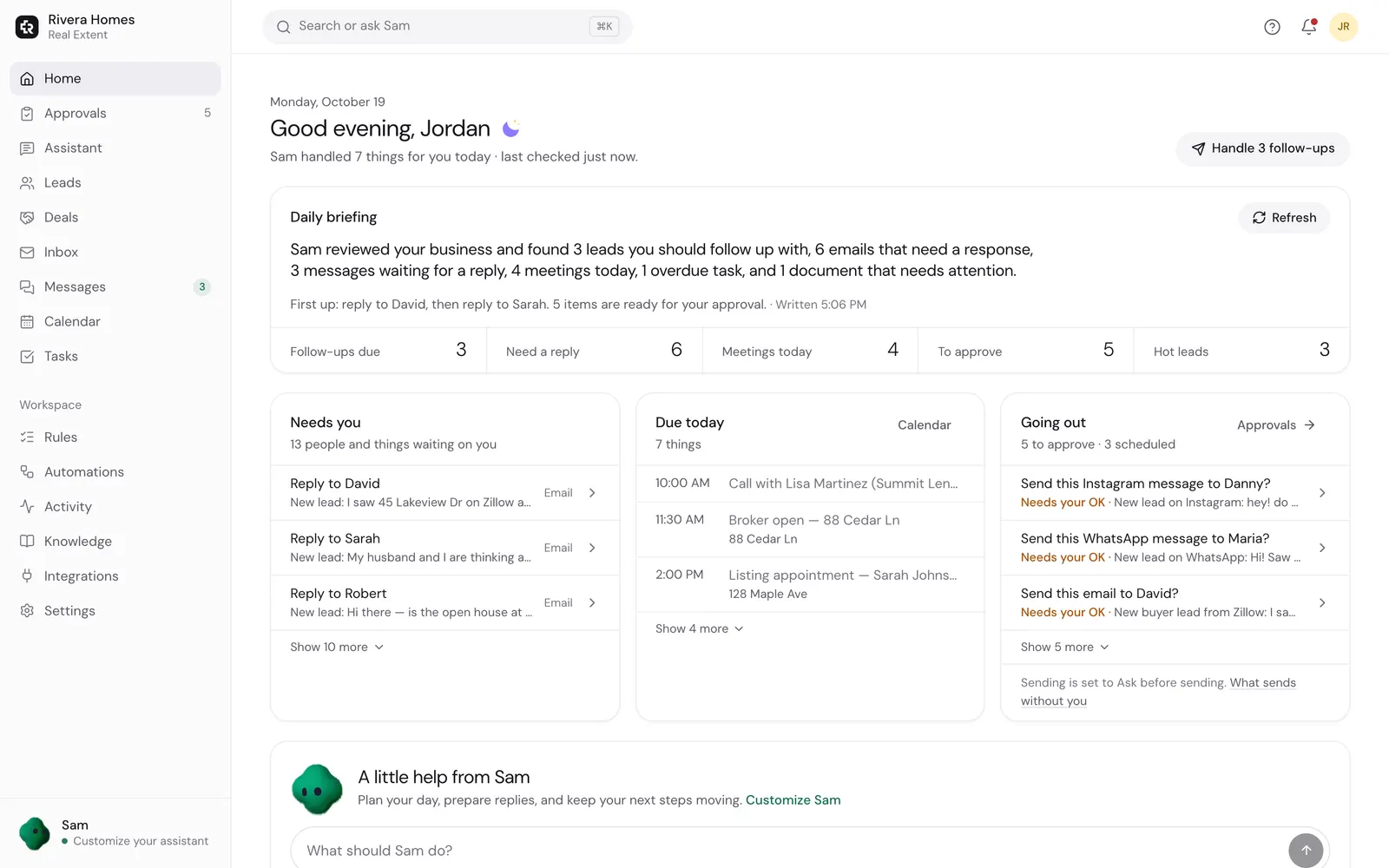
What's in the briefing
- 1
Who needs a reply
New leads first, then important mail, then everyone else. The same count as your inbox.
- 2
Today's schedule
Showings, meetings and calls in order, with all-day events kept separate.
- 3
Deadlines
Inspection, appraisal and closing dates in the next two days.
- 4
Follow-ups due
Who's due today, and whether each one sends on its own or waits for you.
- 5
Waiting for your OK
Drafts and bookings ready to approve, with one tap to review.
- 6
Birthdays and anniversaries
Clients with a birthday or a home anniversary today, with a note ready.
Always current
- The numbers are live. If something changes after the briefing is written, the summary says so instead of showing old counts.
- Pick the time it arrives, or turn it off.
- On a quiet day it says so. It never invents work to fill the space.
- Phone alerts can tell you the moment a new lead writes, so you don't wait for tomorrow's briefing.
Questions agents ask
- Is the briefing an email?
- It's on your home screen in the app, ready when you open it at the time you chose. Phone alerts handle anything urgent during the day.
- What if I have nothing scheduled?
- It tells you that plainly, and lists who's waiting on you, if anyone.
- Does it use my real calendar?
- Yes. It reads the calendar you connected: Google, Outlook, iCloud or another CalDAV calendar.
- Can it handle the follow-ups for me?
- Yes. The Handle follow-ups button sends the ones that are due, within your settings, and tells you why any didn't go.
Start each day knowing exactly what matters
Connect your email and calendar, and tomorrow morning your day is laid out for you.
Plans from $19/month, billed when you subscribe. Sending starts on Ask first. Need setup help?
Keep reading
- Showing bookingReal Extent finds times that fit your calendar and working hours, sends invites, and gives you a booking link clients can use to pick a showing or a call.
- Built-in CRMReal Extent's built-in CRM adds leads from your inbox, scores who to call first, and keeps every email and text with each person on one page, plus tasks, notes and deal dates.
- Lead repliesReal Extent reads new inquiries from Zillow, Realtor.com, your website and open houses, and writes a reply in your voice within minutes. It waits for your OK until you tell it to send on its own.