Deal tracking for real estate agents: every contract date, on time
When a client goes under contract, upload the purchase contract or pick it from Google Drive. Real Extent reads the dates (inspection, appraisal, financing, closing) and lines them up for you to check. Then it reminds you before each one, and can write your client a short update every Friday.
Your listings live here too: a listing description and social posts written for you, buyers in your leads who'd want the home, feedback from buyers' agents after showings, and a price range from the comps you bring.
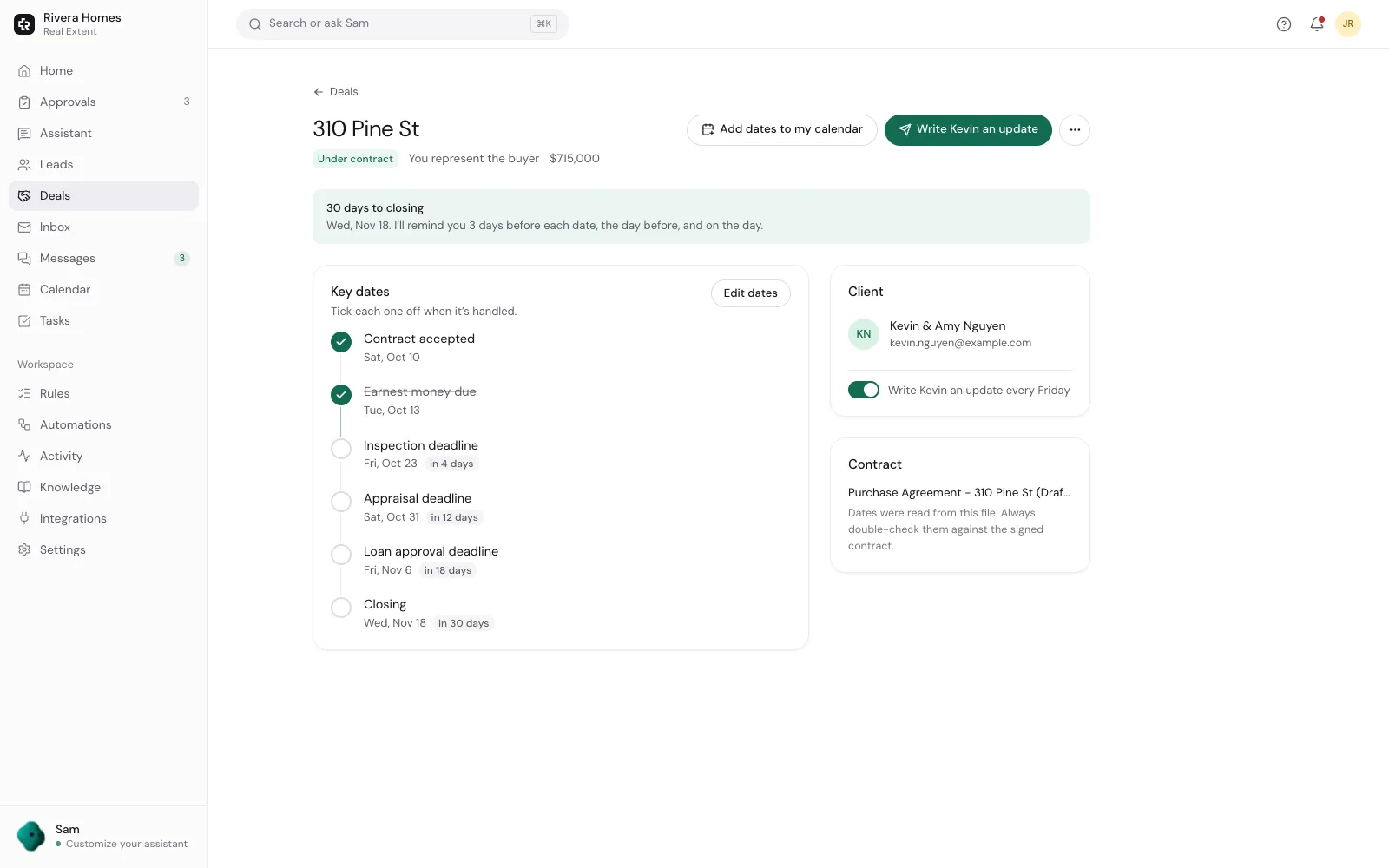
How deal tracking works
- 1
Add the deal
Pick the client, buying or selling, and the price. Upload the contract PDF, or choose it from Google Drive.
- 2
Check the dates
It reads written dates and deadlines like “within 10 days after acceptance.” You look over every date before it's saved.
- 3
Reminders before each date
Three days before, the day before, and on the day, in the app and on your phone. Your morning briefing lists them too.
- 4
Your client stays in the loop
Each Friday it writes them a short update: what's done, what's next, and when closing is. It waits for your OK.
- 5
On your calendar
Add every date to your calendar in one tap, as all-day events with a reminder the evening before.
- 6
It closed
Mark it closed and they become a past client. It remembers the day they got the keys for a home anniversary note.
Your listings, handled the same way
- A listing kit: a description and three social posts, written with fair housing rules in mind. Change the price and the drafts follow.
- Buyers who'd want it: people in your leads whose budget, areas and wish list match the home, with a personal email for each that waits for your OK.
- Showing feedback: about an hour after a showing, the buyer's agent gets a 30-second form, and the answers land on the listing.
- Seller reports: each Friday, a short note to your seller with the week's showings and what buyers said.
- Pricing: bring an export from your MLS and it works out a range from the sold comps, with a one-page printout for the appointment. There's no direct MLS connection.
Questions agents ask
- Which contracts can it read?
- PDF purchase contracts with typed text, up to 4 MB, uploaded or picked from Google Drive. The file is read once and not stored. A scan with no text in it can't be read, so type those dates in yourself.
- Does it connect to Dotloop, SkySlope or other transaction software?
- No. Upload the contract PDF instead. Every date is shown to you before it's saved, so nothing slips in unchecked.
- How does it come up with a price range?
- From the sold comps you bring: the middle half of their price per square foot, times the size of the home. You can leave out any comp and the range is worked out again. It's a starting point for your opinion of value, not an appraisal.
- Do clients get emails without me seeing them?
- Not unless you choose that. Weekly updates, seller reports and emails to buyers about a listing all start on Ask first.
Never miss an inspection deadline again
Upload your next contract and the dates, reminders and client updates take care of themselves.
Plans from $19/month, billed when you subscribe. Sending starts on Ask first. Need setup help?
Keep reading
- Built-in CRMReal Extent's built-in CRM adds leads from your inbox, scores who to call first, and keeps every email and text with each person on one page, plus tasks, notes and deal dates.
- Morning briefingEvery morning Real Extent tells you who is waiting on a reply, today's showings and meetings, deal deadlines, and what's ready for your approval.
- Rules and automationsTell Real Extent once, the way you'd say it: “If Mike doesn't reply in three days, follow up.” It remembers, does it at the right time, and shows you what's lined up.